
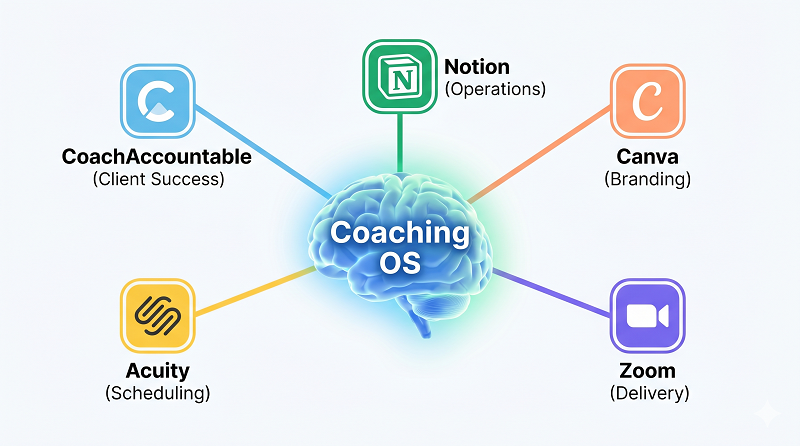
The five software tools every modern Canadian coach needs in 2026 are CoachAccountable for all-in-one client management, Zoom for virtual session delivery, Acuity Scheduling for booking and payments, Notion for business operations and knowledge management, and Canva for professional visual content. Together, these tools cover the full coaching workflow from client intake to content creation while supporting Canadian privacy requirements under PIPEDA. The global coaching industry generated $5.34 billion in revenue in 2025 and the number of practitioners grew 15% year over year. Coaches who invest in the right technology spend less time buried in admin tasks and more time doing what they do best: transforming lives.
Key Takeaway:
- Modern Canadian coaches need the right tech stack to run a professional, efficient, and scalable coaching business while staying compliant with Canadian regulations (taxes, privacy, and payment processing). [1]
- The 5 essential software tools every coach should use are: a reliable CRM/Client Management system, a scheduling & booking tool, a secure payment processor that handles Canadian taxes, a powerful email marketing & automation platform, and a simple project or course delivery tool. [1]
- Top recommendations include: HighLevel or CoachAccountable (CRM), Calendly or Acuity Scheduling (booking), Stripe or PayPal (payments with HST/GST), ConvertKit or MailerLite (email marketing), and Kajabi, Teachable or Google Drive/Notion (course & content delivery). [2]
- Using these tools together saves hours every week, creates a professional client experience, ensures you stay tax-compliant, and allows you to scale your coaching business without burnout. [2]
Bottom Line: The right 5 software tools can transform a Canadian coaching business from chaotic and time-consuming into streamlined, professional, and scalable — giving you more time to coach and grow while staying fully compliant.
- Source: Unleash Your Power – 5 Software Tools Every Modern Canadian Coach Needs
- Source: FAQs Section
Why Your Tech Stack Matters More Than Ever for Canadian Coaches
If you are a coach in Canada right now, you already know the profession is booming. The ICF 2025 Global Coaching Study reported that the global coaching industry reached $5.34 billion in revenue, with the number of active coach practitioners climbing to 122,974 worldwide. North America remains the largest market, and projections suggest the industry will hit $5.8 billion by the end of 2026.
But here is what those numbers do not tell you. The coaches who thrive are not just excellent at coaching. They have systems that handle the business side so they can focus on transformation. When you are toggling between five disconnected apps to schedule a session, send an invoice, take notes, and follow up, you are draining the energy that should go to your clients.
The shift to virtual and hybrid coaching accelerated everything. Roughly 72% of coaching clients now prefer remote or blended sessions. For Canadian coaches specifically, that means your tech stack is not optional. It is the backbone of your client experience. And because you are operating under PIPEDA privacy standards, you need tools that handle personal information responsibly.
Whether you are just starting a life coaching business or scaling your practice in Toronto, the right five tools will transform how you operate. Here is what I have seen work best after 20 plus years of training coaches across Canada.

Coach Accountable: The All-in-One Client Management Hub
Generic CRMs like HubSpot or Salesforce were not built for coaching. They track sales pipelines, not client breakthroughs. CoachAccountable was designed from the ground up for coaches, and that difference shows in every feature.
The platform handles session scheduling, goal tracking, action item assignments, progress metrics, and client accountability all in one place. Your clients get their own portal where they can see their goals, complete worksheets between sessions, and track their progress visually. That kind of structure is not just convenient. It builds the accountability loop that drives real transformation.
In 2026, CoachAccountable completed a full design refresh that modernised the interface while maintaining its signature simplicity. For Canadian coaches, the platform processes payments through Stripe, which operates as a PCI DSS Level 1 certified processor with full Canadian dollar support.
Try This: Set up automated check-in forms that go out 24 hours before each session. When your client arrives already reflecting on their week, you skip the warm-up and dive straight into meaningful work. This is Pillar 3 in action: Courageous Action starts with preparation.
Zoom: The Session Delivery Standard for Professional Coaches
There is a reason Zoom is still the default for professional coaching sessions in 2026, and it is not just familiarity. Zoom offers features that directly serve the coaching workflow in ways that Google Meet cannot fully match.
Breakout rooms allow you to split group coaching sessions into smaller discussion pods, then bring everyone back together. The AI Companion, included with all paid plans at no extra cost, generates meeting summaries, tracks action items, and creates searchable transcripts. For coaches who run discovery calls, group programs, and one-on-one sessions, that level of built-in intelligence saves hours of manual note-taking every week.
Zoom also delivers 1080p video on paid plans and supports up to 1,000 participants for large-scale events. Google Meet limits most group calls to 720p and caps them at 500 participants on its highest tier. If you deliver corporate workshops or keynote presentations, Zoom gives you the room to grow.
Try This: After each coaching session, review the AI-generated summary instead of rewriting your notes from scratch. Use the action items feature to send your client a clear follow-up within minutes of ending the call. That kind of responsiveness builds trust faster than any sales page ever will.

Acuity Scheduling: Booking, Payments, and Client Onboarding in One Place
Scheduling software might sound simple, but for coaches, the booking process is where your client experience begins. Acuity Scheduling stands out from Calendly because it was built for service-based businesses that sell time directly to clients.
Where Calendly focuses on finding available meeting times, Acuity handles the full client journey. You can sell coaching packages with built-in discounts, offer subscriptions and memberships, collect payments upfront through Stripe, Square, or PayPal, and customise intake forms that gather critical information before a session even begins. For Canadian coaches collecting client data, Acuity integrates with payment processors that comply with PIPEDA and PCI DSS standards.
The branded booking page is another differentiator. Your clients see your logo, your colours, and your service descriptions, not a generic scheduling interface. That attention to presentation builds the kind of professional presence that reflects Pillar 4: Compelling Presence.
Try This: Create a detailed intake form that asks your new clients about their top three goals, biggest current challenge, and what success looks like for them. When you walk into that first session already knowing their world, you demonstrate the kind of preparation that sets you apart from every other coach they have considered.
Notion: Your Coaching Business Operating System
If CoachAccountable manages your clients, Notion manages everything else. Session prep templates, program outlines, content calendars, standard operating procedures, and business goals all live in one connected workspace.
The game changer in 2026 is Notion AI Agents. These are not simple chatbots. They are autonomous assistants that can execute multi-step tasks across your workspace for up to 20 minutes at a time. Tell your Notion Agent to compile a weekly client progress summary from your session notes database and it will do the work while you focus on coaching. The agents integrate with Slack, Google Calendar, and other tools your practice already uses.
For coaches who are building a coaching business in the digital world, Notion replaces the scattered combination of Google Docs, Trello, Evernote, and spreadsheets with a single platform. The Business plan at $20 per user per month includes access to multiple AI models, making it more cost-effective than paying for separate AI subscriptions.

Canva: Professional Branding Without a Design Team
Your brand is how clients find you, trust you, and remember you. Canva makes it possible to maintain a polished visual presence without hiring a designer or learning Photoshop.
Magic Studio, Canva’s AI-powered design suite, generates complete designs from a text prompt. Describe what you need, whether it is an Instagram post for a coaching program launch or a workbook cover for your NLP training, and Canva produces multiple options ready to customise. The Brand Kit feature stores your logos, fonts, and colour palette so every piece of content stays consistent.
For coaches who create digital resources like worksheets, course slides, or client handouts, Canva handles it all. Combined with NLP training for business content, you can produce professional materials that position you as the expert you are. Canva Pro covers roughly 80 to 90% of what most non-designers need.
Side by Side Comparison: 5 Essential Coaching Tools for 2026
The following table compares all five tools across the factors that matter most to Canadian coaches. Use it to evaluate which combination fits your practice size, budget, and workflow.
| Tool | Primary Use | Starting Price | CAD Payments | AI Features | Best For |
| CoachAccountable | Client management | ~$20/mo | Yes (Stripe) | Basic automation | Solo and group coaches |
| Zoom | Session delivery | $13.33/mo (Pro) | N/A | AI Companion summaries | Virtual and hybrid coaches |
| Acuity Scheduling | Booking and payments | $16/mo | Yes (Stripe, PayPal, Square) | Automated reminders | Service based coaches |
| Notion | Business operations | $10 to $20/mo | N/A | AI Agents (autonomous) | Coaches who create content |
| Canva | Visual branding | Free to $17/mo | N/A | Magic Studio AI design | Coaches without a design team |
Who Should Use This Tech Stack?
This five-tool combination works best for coaches who deliver sessions virtually or in a hybrid format, manage between 5 and 50 active clients, want professional systems without enterprise complexity, operate in Canada and need tools that support PIPEDA-compliant data handling, and are building or growing a solo or small team practice. Whether you are pursuing life coach training and certification in Canada or already running an established business, this stack scales with you.
Who Should Avoid This Exact Stack?
This combination is not ideal for large coaching organizations with 50 plus coaches who need enterprise platforms like Profi or MentorcliQ, fitness or nutrition coaches who require specialized tools like My PT Hub or Coach Catalyst with wearable integrations, coaches who exclusively meet clients in person and do not need virtual session tools, or practitioners who prefer zero technology and rely entirely on in person, paper based workflows.
Data and Findings: Why Technology Drives Coaching Results
The numbers behind coaching technology tell a compelling story. Here is what the latest research reveals about the impact of the right tools on coaching outcomes.
According to the ICF 2025 Global Coaching Study, the global number of coach practitioners rose 15% since 2023, reaching a record 122,974. Coaches who offer structured digital experiences report stronger client retention and higher session completion rates. Research consistently shows that 87% of organisations report a positive return on investment from coaching, citing gains in productivity, retention, and goal achievement.
The coaching platform market itself is growing at a compound annual growth rate of 13.9% between 2024 and 2034, reflecting how seriously practitioners are investing in technology. Coaches who toggle between disconnected apps lose an estimated 9% of their productive time just from context switching. A consolidated tech stack eliminates that drag and lets you reinvest those hours into client work or business development.
The 5 Tool COACH Framework for Building Your Tech Stack
After two decades of training and coaching professionals across Canada, I have seen what separates coaches who struggle with technology from those who master it. The difference comes down to building your stack with intention, not impulse. Here is the framework I recommend.

Step 1: Connect (CoachAccountable)
Start with your client relationship. Before anything else, you need a system that tracks goals, measures progress, and holds clients accountable between sessions. This is the foundation everything else builds on. It maps directly to Pillar 1: Clarity of Vision.
Step 2: Operate (Notion)
Build your business brain. Create templates for session prep, program delivery, and content planning. Let AI Agents handle repetitive administrative tasks so you can focus on high-value work. This supports Pillar 5: Continuous Growth.
Step 3: Appear (Canva)
Establish your visual identity. Use Brand Kit to lock in your colours, fonts, and logo. Create templates for social posts, worksheets, and presentations that you can reuse and customise. This is Pillar 4: Compelling Presence made practical.
Step 4: Conduct (Zoom)
Deliver sessions with confidence. Set up your Zoom environment with professional lighting, a clean background, and the AI Companion enabled. Record sessions for review and use breakout rooms for group work. This is Pillar 2: Confident Communication in action.

Step 5: Handle (Acuity Scheduling)
Automate the business of coaching. Configure your packages, intake forms, and payment processing so clients can book, pay, and prepare without a single email from you. This is Pillar 3: Courageous Action applied to your operations.
Frequently Asked Questions
What is the best all-in-one software platform for coaches in Canada?
CoachAccountable is the strongest all-in-one platform designed specifically for coaching workflows. It combines session scheduling, goal tracking, client accountability metrics, progress reports, and payment processing through Stripe in Canadian dollars. Unlike generic CRMs that require heavy customisation, CoachAccountable works out of the box for life coaches, business coaches, and leadership development practitioners operating across Canada.
How much does a complete coaching tech stack cost per month in 2026?
A professional five-tool coaching stack costs approximately $100 to $150 per month in 2026. That typically includes CoachAccountable at around $20 per month, Zoom Pro at $13.33 per month, Acuity Scheduling starting at $16 per month, Notion Plus or Business at $10 to $20 per month, and Canva Pro at $17 per month. Many of these tools offer free tiers or trials, so new coaches can start with a smaller investment and upgrade as their client base grows.
Do Canadian coaches need PIPEDA-compliant software tools?
Yes. Any coach operating a commercial practice in Canada and collecting personal client information is subject to the Personal Information Protection and Electronic Documents Act. This means your scheduling tool, payment processor, and client management platform all need to handle personal data responsibly. Choose tools that use encrypted data storage, PCI DSS-certified payment processing, and transparent privacy policies. Stripe, which integrates with both CoachAccountable and Acuity, is PCI DSS Level 1 certified and supports PIPEDA compliance.
Is Zoom still better than Google Meet for coaching sessions in 2026?
For professional coaching, Zoom remains the stronger choice in 2026. It offers breakout rooms with pre-assignment and host monitoring, an AI Companion that generates meeting summaries and action items at no extra cost on paid plans, 1080p video for group calls, and integration with over 3,000 third-party tools. Google Meet is a solid option for quick internal calls and works well if you already use Google Workspace, but it lacks the advanced session management features that coaches rely on for group programs, workshops, and recorded client sessions.
What is the biggest mistake coaches make when choosing software tools?
The most common mistake is buying too many tools too soon. New coaches often sign up for every platform they see recommended online and end up overwhelmed, underutilising most of them, and spending more than necessary. Start with the tool that addresses your biggest bottleneck first. For most coaches, that is either client management or scheduling. Add one tool at a time, learn it thoroughly, and only expand your stack when you have a clear operational need. The COACH Framework above gives you the order that works best for building a sustainable technology foundation.
Your Next Step: Build the Systems That Let You Focus on Transformation
The right technology does not replace the human connection at the heart of coaching. It protects it. When your admin runs itself, when your clients show up prepared, when your brand looks polished without hours of design work, you get to do what you became a coach to do: change lives.
If you are ready to build a coaching practice that runs with clarity, confidence, and purpose, explore James R. Elliot’s life coach training and certification programs in Canada. With 20 plus years of experience and Board Designated Trainer credentials, James has helped thousands of professionals transform their skills into thriving businesses.
Unleash Your Power: Stand Out, Take Action, and Create the Success You Want.